Skip to content
You probably know the feeling: you install several IPTV apps, switch between devices, deal with buffering, and still cannot enjoy a smooth viewing experience. You want one place where everything works cleanly, loads fast, and stays organized. That is exactly why many users are now exploring United Kingdom IPTV solutions combined with Plex. When you integrate plex for iptv correctly, you gain a centralized media hub that feels professional, reliable, and easy to control from any screen in your home. Instead of fighting unstable apps, you create a consistent system that works on Smart TVs, mobile phones, laptops, and tablets.
This guide is written for you if you want a practical, step-by-step method to build a stable IPTV environment that scales with your needs. You will learn how to prepare your system, configure your playlist, optimize streaming quality, and avoid common mistakes. By the end, you will understand exactly how plex for iptv can simplify your entertainment setup and give you long-term flexibility.
Table of Contents
What Is Plex and How Does IPTV Work Together?
Understanding Plex Media Server
Plex is a media server platform that allows you to store, organize, and stream content across multiple devices. Once installed on a computer, NAS, or dedicated server, Plex acts as a central hub that delivers media to your TV, phone, or browser. You control everything from a single dashboard, including user permissions, streaming quality, and remote access.
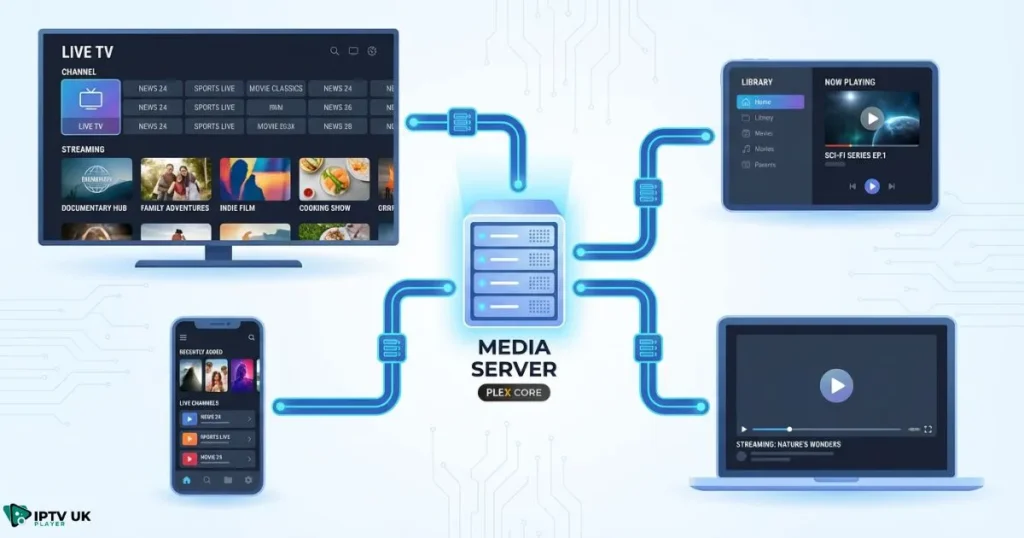
- Centralized media management
- Remote streaming from anywhere
- Device compatibility across major platforms
- Custom libraries and profiles
Can Plex Handle IPTV Streams?
By default, Plex does not load IPTV playlists directly. However, you can bridge IPTV streams using middleware tools that convert M3U playlists into a format Plex recognizes as live channels. This process allows you to integrate live TV into your Plex interface while maintaining the same navigation style and playback controls you already use.
When you configure plex for iptv correctly, your channels appear inside Plex as live television with guide data, channel groups, and searchable listings.
Why Users Choose Plex Live TV IPTV
- Unified interface for movies, series, and live TV
- Electronic program guide support
- Consistent playback experience
- Scalable multi-user management
What You Need Before Starting Plex IPTV Setup
Hardware Requirements
Before you begin, confirm that your system meets the minimum performance requirements:
- Processor: Quad-core CPU recommended
- Memory: At least 4 GB RAM
- Storage: SSD preferred for faster response
- Network: Stable broadband connection
Software Requirements
- Plex Media Server
- IPTV bridge software such as xTeVe or Threadfin
- M3U playlist and EPG source
- Plex client app for your devices
Choosing a Reliable IPTV Provider
Your IPTV source directly affects stream stability, channel uptime, and guide accuracy. Look for providers offering consistent servers, updated playlists, and responsive support. Many users compare options using guides that review trusted IPTV services in the UK market to ensure quality and compatibility.
IPTV UK Player offers multiple subscription plans and a free 24 to 48-hour trial so you can validate performance before committing.
Step-by-Step Plex IPTV Setup Guide
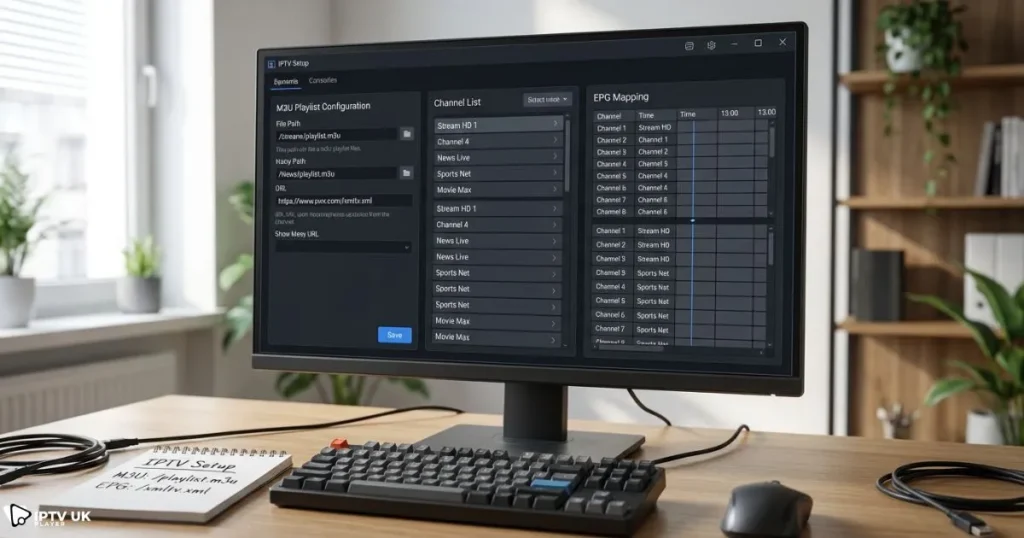
This section walks you through the entire plex iptv setup process in a structured way so you avoid configuration errors and wasted time.
Step 1: Install Plex Media Server
- Download Plex Media Server from the official website.
- Create or sign in with your Plex account.
- Complete the initial server setup wizard.
- Enable remote access if needed.
Step 2: Install IPTV Bridge Software
Bridge software converts your IPTV playlist into a tuner format Plex understands.
- Install xTeVe or Threadfin.
- Assign a local port.
- Verify network connectivity.
Step 3: Import Plex M3U Playlist
- Paste your M3U URL.
- Filter unwanted channels.
- Group channels logically.
Step 4: Configure EPG Data
- Upload XMLTV guide file.
- Match channels manually if needed.
- Schedule automatic refresh.
Step 5: Connect IPTV Bridge to Plex
- Add network tuner in Plex settings.
- Scan channels.
- Validate guide mapping.
Once complete, you are ready to enjoy plex for iptv across your devices.
How to Use IPTV on Any Device with Plex
Smart TVs
- Install Plex app from the TV app store.
- Sign in with your account.
- Navigate to Live TV section.
Mobile Devices
- Install Plex from Google Play or App Store.
- Enable mobile streaming quality control.
- Use Wi-Fi when possible.
Computers and Browsers
- Access Plex via browser dashboard.
- Adjust transcoding settings for performance.
With the right configuration, plex for iptv delivers consistent playback on every screen.
Optimizing Plex Live TV IPTV Performance

Reduce Buffering
- Enable hardware transcoding.
- Use wired Ethernet when possible.
- Select appropriate streaming quality.
Organize Channels
- Create favorites list.
- Hide unused categories.
- Rename channels for clarity.
When optimized correctly, plex for iptv feels like a premium live TV platform rather than a simple IPTV player.
Common Problems and How to Fix Them
Channels Not Loading
- Verify playlist validity.
- Restart bridge software.
- Check firewall rules.
Guide Not Displaying
- Refresh XMLTV source.
- Re-map channels.
Playback Freezing
- Lower transcoding load.
- Upgrade hardware if necessary.
Many troubleshooting steps apply specifically when running plex for iptv in high channel environments.
Plex IPTV vs Traditional IPTV Apps
| Feature | Plex IPTV | Standard IPTV Apps |
|---|---|---|
| Unified Interface | Yes | Limited |
| Multi-device Sync | Yes | Partial |
| Customization | Advanced | Basic |
| Setup Complexity | Medium | Low |
If you prefer simplicity, a standard IPTV app may be enough. If you want scalability and full control, plex for iptv offers more flexibility.
Choosing the Best IPTV Subscription for Plex
Your IPTV provider determines channel stability and streaming quality. Some users prioritize value using affordable IPTV packages, while others prioritize premium performance and support.
Before committing, many users compare providers through independent reviews such as high-performance IPTV streaming services and trusted rankings like verified IPTV platform comparisons.
IPTV UK Player supports M3U compatibility, fast activation, and flexible plans. If you want stable integration with plex for iptv, testing via the free trial helps eliminate guesswork.
Security and Responsible Streaming
Always protect your network and accounts. Keep software updated, secure your router, and follow regional content regulations. For official documentation on Plex security and setup practices, you can reference the Plex support center.
Advanced Tips for Power Users
Automate Playlist Updates
- Schedule playlist refresh.
- Monitor expired links.
Multi-Source IPTV Management
- Combine multiple playlists.
- Prioritize stable sources.
DVR Storage Planning
- Allocate sufficient disk space.
- Manage recording schedules.
Advanced tuning further improves plex for iptv performance in demanding environments.
Frequently Asked Questions About Plex for IPTV
Is plex for iptv suitable for beginners?
Yes, once you follow a structured setup process, you can manage it easily even without advanced technical skills.
Does plex for iptv support EPG guides?
Yes, guide data can be imported using XMLTV sources.
Can plex for iptv stream outside your home network?
Remote access allows streaming from anywhere when configured properly.
What internet speed is recommended?
A stable connection above 25 Mbps is ideal for HD streams.
Conclusion: Build a Smarter IPTV Experience
When configured correctly, plex for iptv gives you long-term stability, flexibility, and control over your entertainment system. You eliminate app hopping, reduce playback issues, and gain a single platform that scales with your needs. If you want a reliable IPTV source to support your setup, explore United Kingdom IPTV plans and test performance with the free trial. This approach allows you to validate quality before upgrading, ensuring your system delivers consistent results every day. Start building your optimized IPTV environment today and experience a smarter way to stream using United Kingdom IPTV.